

PuTTY is free, open-source software (MIT licence) written by Simon Tatham and a small team. It has been around long enough that its name appears on many websites that have nothing to do with the developers. This page shows you where the real files live, which one to pick for your PC, and how to confirm the file you downloaded is the genuine one.
Download PuTTY from the official siteOpens the official PuTTY download page. We host no files.
The only official PuTTY site
The developer’s own site sits on a university-style address: chiark.greenend.org.uk/~sgtatham/putty. It looks plain, and that is expected — it is a personal home page, not a product portal. The current files are always on the latest release page.
When you search for “PuTTY download”, the results often include look-alike sites with PuTTY in the domain name, polished designs and their own download buttons. They are not run by the PuTTY team. Some simply link back to chiark; others host their own copies, and unofficial download sites may bundle extra software. There is no reason to take the chance: bookmark the chiark address and start from there every time.
Rule of thumb: if the address bar does not say chiark.greenend.org.uk (or the Microsoft Store app), it is not the developer’s download.
MSI, stand-alone exe or Microsoft Store?
The current release is 0.85, published on 2026-08-16. The latest release page offers three Windows Installer (MSI) packages, one per processor type:
| Your PC | File to download | Notes |
|---|---|---|
| Most desktops and laptops (Intel or AMD, 64-bit Windows) | putty-64bit-0.85-installer.msi | The right choice for almost everyone |
| Windows on Arm (for example Snapdragon laptops) | putty-arm64-0.85-installer.msi | Native Arm build |
| Very old PCs running 32-bit Windows | putty-0.85-installer.msi | Only if the 64-bit file will not install |
Not sure which you have? Open Settings > System > About and read the “System type” line. It says whether Windows is 64-bit and whether the processor is x64 or Arm-based.
The two alternatives
Microsoft Store. The developers publish PuTTY in the Microsoft Store themselves, usually a few days after each release. This is convenient on managed PCs where the Store is allowed and you want Windows to handle updates. The Store copy may lag the website briefly after a new release.
Stand-alone binaries. Further down the latest release page, each program is available as a single .exe you can download on its own. Nothing is installed; you just run the file. This suits PCs where you have no admin rights, or a USB stick of admin tools.
What you actually get
“PuTTY” is really a small family of programs. The MSI installs all of the ones in this table; the stand-alone downloads let you take only the ones you need.
| File | What it does | When you would use it |
|---|---|---|
putty.exe | The SSH and Telnet client with a terminal window | Everyday logins to servers and network devices; serial consoles |
pscp.exe | Command-line SCP file copy | Copying a file to or from a server in one command |
psftp.exe | Interactive command-line SFTP | Browsing and transferring files without a GUI |
plink.exe | Command-line connection tool | Running a remote command from a batch file or script |
pageant.exe | SSH agent | Holding your unlocked private keys so you type the passphrase once |
puttygen.exe | Key generator | Creating an SSH key pair (.ppk private key) |
Two rarely needed extras, PuTTYtel and pterm, are not included in the MSI. If you want a graphical file manager rather than pscp, see our WinSCP download guide.
Install the 64-bit MSI
Download the MSI
On the latest release page, under the MSI section, click the 64-bit x86 link and save
putty-64bit-0.85-installer.msito your Downloads folder.Check it before running
Take thirty seconds to run the checks in Verify the file. It is the easiest point to catch a wrong file.
Run the installer
Double-click the MSI. Windows shows a UAC prompt because the installer writes to Program Files; confirm it if the publisher details look right.
Accept the defaults
The setup wizard asks for a destination folder and which parts to install. The defaults are fine for most people. The exact wording may differ slightly between versions.
Finish
Click Install, then Finish. PuTTY, PuTTYgen, Pageant and the other tools now appear in the Start menu.
Use putty.exe without installing
If you only need the terminal client, download putty.exe from the stand-alone section of the latest release page (pick the same processor type as in the table above). Put it in a folder you control, such as C:\Tools\PuTTY, and pin it to Start or the taskbar.
Verify the file
PuTTY’s Windows files carry an Authenticode digital signature, which Windows can check for you. The fastest route is the file’s Properties: right-click the MSI or putty.exe, choose Properties, open the Digital Signatures tab, select the entry and click Details. Windows should report that the signature is OK, with the developer, Simon Tatham, as the signer.
The same check in PowerShell, plus a SHA-256 hash you can keep for your records:
cd $env:USERPROFILE\Downloads
Get-AuthenticodeSignature .\putty-64bit-0.85-installer.msi | Format-List Status, SignerCertificate
Get-FileHash .\putty-64bit-0.85-installer.msi -Algorithm SHA256Statusreads Valid.- The signer certificate names Simon Tatham.
- The file name matches the processor type you chose.
- The hash matches the checksum files linked from the latest release page, if you compare them.
Each download also has a matching GPG signature file. If you already use GPG you can check it against the release keys published on the developer’s site; for most Windows admins the Authenticode check above is enough.
First launch
Start PuTTY from the Start menu (or double-click putty.exe). There is no main window as such: you get the PuTTY Configuration dialog, with a Category tree on the left and the Session page on the right. Type a host name, press Open, and a terminal window appears.
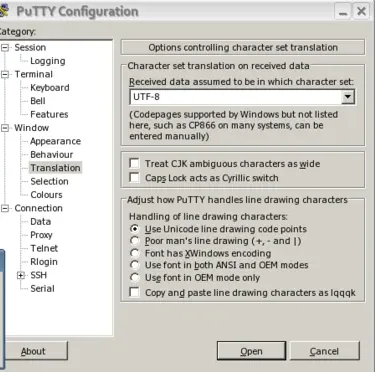
A useful first setting while you are here: Window > Translation should be set to UTF-8 so that Linux servers display correctly. The PuTTY guide walks through your first session step by step. Use it on networks and devices you own or administer.
Updating and removing PuTTY
PuTTY has no automatic updater. Check the latest release page now and then, or when your team hears about a new release.
- MSI install
- Download the newer MSI for the same processor type and run it. It replaces the older installed version; you do not need to uninstall first.
- Stand-alone exe
- Download the new
putty.exeand overwrite the old file. - Microsoft Store
- Updates arrive through the Store like any other app.
- Saved sessions
- Kept separately under your Windows user account, so upgrading does not remove them.
To remove PuTTY, open Settings > Apps > Installed apps, find the PuTTY entry and choose Uninstall. For the stand-alone version, just delete the file.
Troubleshooting
The MSI refuses to install, mentioning the processor or platform.
Likely cause: You downloaded the package for a different processor type (for example the Arm file on an Intel PC).
Fix: Check Settings > System > About and download the matching MSI from the table above.
The installer asks for administrator credentials you do not have.
Likely cause: Installing to Program Files needs admin rights.
Fix: Ask your IT team to install it, use the Microsoft Store version if your organisation allows it, or use the stand-alone putty.exe from your own folder.
Windows shows a warning before opening the file.
Likely cause: Windows is cautious with files downloaded from the internet.
Fix: Confirm the file came from chiark.greenend.org.uk and that Properties > Digital Signatures shows a valid signature. If either check fails, delete the file and download it again.
The Digital Signatures tab is missing.
Likely cause: The file may be incomplete, renamed from something else, or from another site.
Fix: Delete it and download again from the latest release page.
You still see an older version after updating.
Likely cause: A stand-alone putty.exe elsewhere on the PC, or a pinned shortcut to it, is being started instead of the installed one.
Fix: Open About in the configuration dialog to see the version, and remove or replace the old copy.
Get PuTTY 0.85 from the developer’s siteOpens the official PuTTY download page. We host no files.